AI Avatar Creator & Cartoonify
- 4.6
- Rating
- 10.00K
- Installs
- Free
- Price

 Analysis by App-foxy
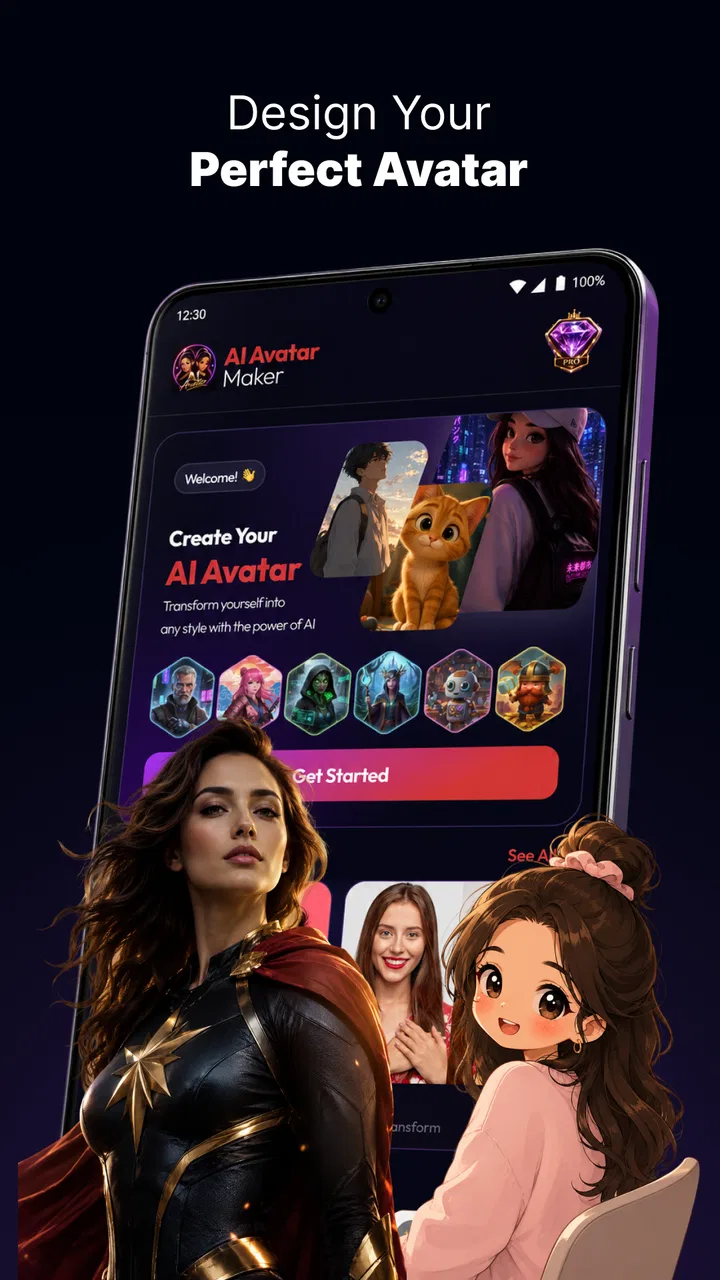
I tried AI Avatar Creator & Cartoonify as a quick way to turn ordinary photos into illustrated profile images, and its appeal is easy to understand. Instead of opening a full desktop editor, choosing brushes, and spending time learning a complicated workflow, I could start with a photo and explore a more playful visual identity. The app sits in the Art & Design category, but it feels aimed at everyday creativity rather than professional illustration.
That distinction matters. I would not treat it as a replacement for drawing software or a serious photo-retouching suite. I see it as a lightweight tool for people who want an avatar, a cartoon-style portrait, or an anime-inspired version of themselves without doing the artwork manually. The experience is most convincing when I use it for social profiles, messaging apps, casual gifts, or a small creative experiment.
It is developed by Kafadengi Bilisim and currently carries a 4.6 average from around 82 ratings, with over 10 thousand installs. Those figures suggest a small but interested audience rather than a long-established mainstream editor. The app is free to install, rated for Everyone, and supports Android 7.0 or later. There are also in-app purchases ranging from $4.99 to $29.99 per item, so I would explore the free experience before deciding whether the extra options fit my needs.
You May Also Like

 Blood Strike: 2.5 Anniversary
Blood Strike’s Loadouts Turn Every Drop Into a Tactical Gamble
A close look at Blood Strike’s custom loadouts: how fast access to signature weapons reshapes its battle royale rhythm, rewards preparation, and narrows the gap between fights.

 Pandora - Music & Podcasts
Pandora’s Music Is Easy to Start, but Harder to Recover
Pandora’s strength is its low-effort path from a seed to a station. Its weak spot is how much confidence it asks you to place in connection, setup, and quiet recovery.

 8 Ball Pool
8 Ball Pool Is Built on Rivalries, Rematches, and Routine
A close look at the rivalries, rematches, shared routines, and unanswered safety questions that turn a quick pool match into a persistent mobile community.

 Samsung Music
Samsung Music’s Quiet Strength Is Playing What You Already Own
Its reach comes less from spectacle than from dependable access to a personal library. That simplicity is both the app’s strongest retention engine and its ceiling.

 AccuWeather: Weather Radar
AccuWeather Review: A Quick, Clear Forecast for Everyday Decisions
For everyday plans, the best forecast is the one you can understand quickly. AccuWeather makes rain timing, radar, and local conditions easy to act on, with a few trade-offs.

 Hill Climb Racing
Why Hill Climb Racing Still Turns Crashes Into One More Run
A tiny car, a bumpy hill and one more upgrade: Hill Climb Racing keeps resurfacing because its simple chaos makes every near-miss feel personal.
More From Our News Desk
View All News


How the current experience feels in everyday use
The basic idea is straightforward: choose a suitable photo, let the app reinterpret it, and decide whether the result is worth keeping or sharing. I found that the starting image has a bigger effect than I first expected. A clear face, good lighting, and a simple background give the visual transformation more to work with. A dark group photo or an image with the face partly hidden is a poor test of the app because the source itself makes the result harder to judge.
For a realistic example, imagine taking a portrait after a haircut and wanting a new messenger image without posting the original photograph. I would select a well-lit head-and-shoulders picture, compare the available artistic treatments, and keep the version that preserves the most recognizable features. That workflow is quicker than manually removing a background or tracing facial details, while still giving the profile image a personal touch.
The strongest use case is not perfect likeness. It is controlled variation. I can make one image feel more like a cartoon, another more like an anime character, and then choose the style that matches the account or conversation where I plan to use it. That makes the app more enjoyable than a simple one-tap filter, because the result can serve a different mood even when the source photo stays the same.
I would also use it for low-pressure creative tasks. A family member might want a fun birthday image, a small online community might need informal profile pictures, or someone could create a themed image for a private chat. These are situations where speed and novelty matter more than exact editing control. The app makes sense when the goal is to produce something distinctive in a few minutes, not when every line, color, or facial proportion must be adjusted by hand.
Choosing photos is the most important practical skill
My first tip is to prepare several source photos instead of relying on one. A front-facing portrait may preserve identity better, while a slightly turned pose can create a more expressive avatar. I would avoid sunglasses, heavy shadows, busy backgrounds, and faces cropped too tightly. This is not a hidden button or advanced setting; it is the part of the workflow that most directly improves the outcome.
A second useful habit is to judge the generated image at its intended size. An avatar that looks charming as a small profile circle may reveal strange hair edges or inaccurate details when enlarged. Conversely, a result that seems a little unusual at full-screen size may work perfectly in a small icon. I would not reject an image until I had considered where it will actually appear.
It is also worth keeping the original photo separate from the transformed version. I prefer to treat the generated image as a creative copy rather than an edited replacement. That makes it easier to try different styles without losing the source and helps when I want to compare whether the app has preserved the person’s expression, hairstyle, and general character.
What the latest version means for users
The current version is 1.2.0, and the release date is listed as June 15, 2026. I read that as a sign that the app is still in a relatively early stage of its product life. The version number gives existing users a useful point of reference: anyone comparing an older installation with the current experience should update before judging the app, because the present build is the one that represents its active direction.
There is no reason to assume that a version number alone guarantees a dramatic redesign. In practical terms, I would expect the most meaningful improvements in an app like this to show up through smoother photo handling, more dependable transformations, clearer result selection, and better consistency between different source images. Those are the areas I would pay attention to when moving from an earlier build, rather than expecting the app to become a full creative studio overnight.
For a new user, version 1.2.0 is less important than compatibility. The minimum Android requirement of 7.0 keeps the app accessible to many older devices, although the quality of the experience can still depend on the phone’s camera, screen, storage, and general performance. I would leave some free space available before creating several images, especially if I plan to keep multiple variations rather than immediately deleting them.
The app’s development by Kafadengi Bilisim also gives the product a clear identity: it is focused on a compact, approachable transformation tool rather than a broad collection of unrelated creative utilities. That focus is helpful because I can understand what the app is for immediately. The trade-off is that users looking for layers, masks, manual color correction, or detailed retouching will probably reach its limits quickly.
What existing users should know before updating or paying
If I were already using an earlier version, I would first save the avatars I genuinely like before changing anything. That is a sensible habit with any image app, especially when the main value lies in generated results that may be difficult to reproduce exactly. I would then test the current build with the same source photo and compare the overall look, not just whether a button or screen has changed.
I would also avoid assuming that every style is equally useful. Some treatments may suit a close-up portrait but make a full-body photo feel less convincing. Others may work well for a playful account but look out of place on a professional profile. The best way to evaluate the update is to test the kinds of images I actually use, rather than choosing a dramatic sample that does not represent my normal workflow.
The free installation lowers the barrier to trying it, but the in-app purchase range deserves attention. I would not pay simply because a result looks novel after the first attempt. I would ask whether I expect to create avatars repeatedly, whether the available styles fit my needs, and whether I am comfortable with the value of the particular item offered. For occasional use, the free portion may be enough; for regular profile and content creation, paid options could make more sense if they provide styles I would genuinely use.
One trade-off is convenience versus control. The app can save me from manual editing, but I give up the ability to correct every small detail myself. If the generated face changes a distinctive feature or produces an awkward outline, I would rather return to the source photo and try another treatment than spend time trying to repair the result inside an app designed for quick transformation.
Where it still falls short
The biggest limitation is inherent to this type of tool: an artistic interpretation is not always a faithful portrait. That can be charming when I want a playful character, but disappointing when I need the avatar to look unmistakably like me. I would skip this app for identity-sensitive work, formal professional imagery, or any project where facial accuracy matters more than style.
It is also not the right choice for someone who wants to create original artwork from a blank canvas. A traditional drawing app offers more control over composition, line work, color, and revision. A conventional photo editor is better when the goal is to remove a blemish, adjust exposure, crop precisely, or combine several images. This app’s strength is the transformation itself, not detailed editing after the transformation.
Another limitation is that novelty can wear off. The first few avatar variations feel entertaining because the change is immediate. After that, the value depends on whether I have a real reason to keep creating new images. If I only need one profile picture, a dedicated portrait editor or a manually selected photo may be the more efficient option.
I would also be cautious with personal photos. Even when an app is simple to use, I prefer not to upload images of other people without their permission, particularly children or anyone who may not want an altered portrait shared publicly. That is good practice for any photo-based creative service and becomes especially important when the result changes someone’s appearance into a stylized character.
Who will enjoy it most
I think this app suits casual creators, social media users, anime and cartoon fans, and anyone who wants a more memorable profile image. It is especially useful for people who find professional editing software intimidating. The low learning curve makes it approachable for a teenager experimenting with a new identity online, a parent creating a humorous family image, or a small community looking for consistent but informal avatars.
It can also help when I need several visual directions quickly. Rather than spending an hour deciding how to redraw a portrait, I can compare different interpretations and use the strongest one as a starting point for a post or private project. That speed is the app’s real advantage over manual alternatives.
I would recommend skipping it if I need exact control, high-end retouching, a transparent workflow for professional client work, or a dependable likeness for official use. I would also hesitate if I dislike stylized results altogether. A standard photo editor will be more appropriate for natural-looking improvements, while a drawing application will be better for building an image from my own ideas.
My practical workflow for better results
My preferred process is deliberately simple. I begin with a small selection of clear portraits, choose one where the face is easy to read, and create more than one interpretation before deciding. I compare them for recognizability, expression, and how well the image survives at a small size. This prevents me from choosing a visually dramatic result that becomes confusing when used as an avatar.
Next, I think about the destination. A cartoon portrait for a gaming profile can be more exaggerated than one for a work-related account. An anime-inspired image may be perfect for a fan community but less suitable for a family group. Matching the style to the audience is a small decision, yet it makes the final image feel intentional rather than randomly generated.
Finally, I keep the best version and the original, then stop when the result is good enough. Repeating the process endlessly can turn a quick creative task into unnecessary browsing. The app works best when I use it to make a decision easier, not when I expect every variation to improve on the last one.
What I would watch as the app develops
Because the app is at version 1.2.0 and has a modest install base, I would watch how consistently it evolves. The most valuable progress would be clearer differences between styles, better handling of varied lighting and poses, and a smoother way to compare or preserve favorite results. Those improvements would directly affect whether the app remains useful after the initial novelty fades.
I would also watch the balance between free access and paid content. Since the app is free to install but includes individual purchases from $4.99 to $29.99, the long-term experience will depend on whether the no-cost tools remain useful for occasional users and whether paid choices offer meaningful creative value. I would prefer transparent, understandable options over paying for minor variations that do not change how I use the final image.
My overall impression is positive but specific. This is a convenient avatar-making tool, not a complete art workstation. It gives me a fast route from a normal portrait to something more expressive, and that is enough to make it worthwhile for casual visual projects. Its limitations become clear when I ask for precision, manual correction, or professional consistency.
For someone who wants a playful profile image and is happy to experiment with source photos, I would recommend giving AI Avatar Creator & Cartoonify a try through its free installation first. I would judge it on the quality of the results I can create with my own pictures, not on the most dramatic example. If those images feel recognizable, useful, and worth sharing, the app has found its place; if I need control more than convenience, a traditional editor will remain the better choice.
FAQs for AI Avatar Creator & Cartoonify
01What is AI Avatar Creator & Cartoonify, and what can it do?
AI Avatar Creator & Cartoonify is an image-editing app designed to transform selfies and existing photos into stylized avatars, cartoon portraits, and other AI-generated looks. After uploading a picture, you can usually choose from different artistic effects, character styles, and enhancement options. Results depend heavily on the original photo, lighting, facial visibility, and the specific tools available in the current version.
02Is AI Avatar Creator & Cartoonify free to download and use?
The app may be available to download for free, but some features, filters, export options, or higher-quality results can require in-app purchases or a subscription. Before confirming a trial or payment, carefully review the pricing page, renewal terms, and cancellation instructions shown in the app store. Free access may also include advertisements or limits on the number of creations you can generate.
03How do I create a cartoon avatar with AI Avatar Creator & Cartoonify?
To create an avatar, open the app, select a clear selfie or photo from your device, and follow the instructions for uploading or processing the image. Choose a cartoon, anime, artistic, or other available style, then wait while the app generates the result. For better output, use a well-lit image with one visible face, minimal obstruction, and a neutral or natural expression.
04Does AI Avatar Creator & Cartoonify protect uploaded photos and personal data?
Before using the app, review its privacy policy and the permissions requested on your Android or iOS device. AI photo tools may process images on the device, on remote servers, or through third-party services, depending on how the feature works. Avoid uploading sensitive photos, identification documents, or pictures of other people without permission, and check whether uploaded images are stored or deleted.
05Can I save and share the avatars created with the app?
Most avatar and cartoon-making apps provide options to save finished images to your device or share them through social networks, messaging apps, and email. However, export resolution, watermarks, file formats, and sharing options can vary between free and premium versions. Check the final preview before saving, especially if you plan to use the image as a profile picture, print it, or publish it commercially.
Pros
- Creates fun AI avatars from selfies in just a few taps.
- Offers multiple cartoon
- anime
- and artistic styles to explore.
- Simple interface makes editing accessible for beginners.
- Useful for profile pictures
- social posts
- and messaging apps.
- Results can be saved and shared directly from the app.
Cons
- Some styles may produce inconsistent facial details or proportions.
- High-quality exports and premium styles may require payment.
- Processing can take longer when servers are busy.
- Uploading selfies may raise privacy concerns for some users.
- The free version may include ads or limit daily creations.

AI Avatar Creator & Cartoonify
Gallery